
USER GUIDE
SCRAM Remote Breath Pro®
Learn how Remote Breath® Pro works, what to expect during testing, and how to use the device properly throughout your monitoring program
USER GUIDE
Learn how Remote Breath® Pro works, what to expect during testing, and how to use the device properly throughout your monitoring program
Whether it is a scheduled test or an On-Demand test, the device will automatically wake up to prompt you to take a breath test by producing an audible alarm and displaying on-screen instructions.
There is no need to wake the device prior to a scheduled breath test.
To ensure the best possible breath test and photo, be in a well-lit area away from direct sunlight and remove your hat, sunglasses, and any hair hanging over your face. Stand with your back to a light-colored, solid, non-reflective background.
Once the device has alerted you to complete a breath test:
.png%3F2026-04-28T16%253A46%253A32.891Z&w=3840&q=80)
.png%3F2026-04-28T16%253A50%253A58.224Z&w=3840&q=80)
.png%3F2026-04-28T17%253A38%253A41.571Z&w=3840&q=80)
.png%3F2026-04-28T19%253A10%253A34.073Z&w=3840&q=80)
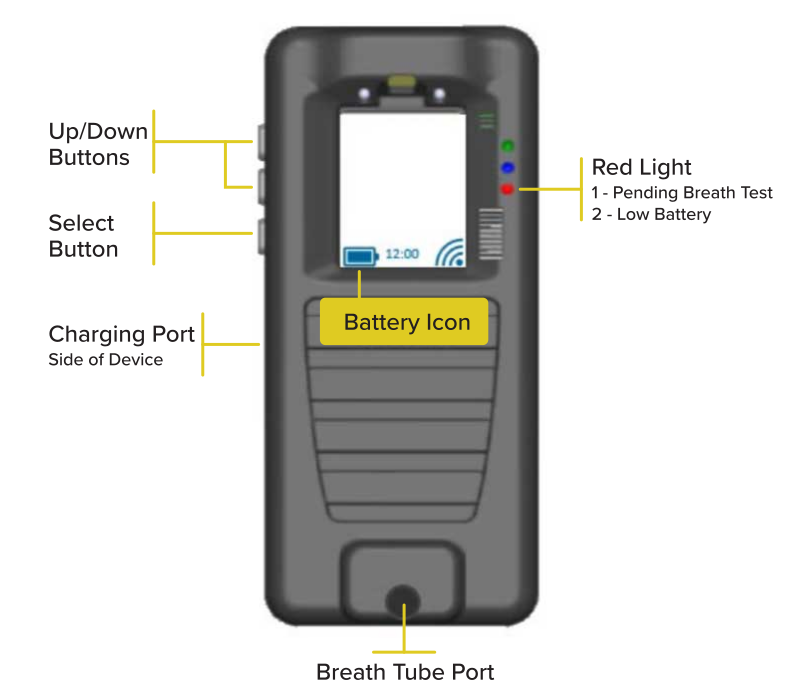
If your monitoring program allows voluntary breath tests, to take one, start by pressing the select button to wake up the device. Press the select button again to display the on-screen menu. Use the up and down buttons to highlight the menu option of “Test.” Once highlighted, press the select button to begin the test. The device will produce an audible alarm and provide on-screen instructions to complete a breath test. If the “Test” menu option is not available, tell your supervising authority immediately.
.png%3F2026-04-28T19%253A16%253A20.019Z&w=3840&q=80)
Select Volume from the menu and use the up and down buttons to adjust the volume of the audible alert sound. If the volume is set to mute, the device will vibrate to alert you when a breath test is required. Regardless of the volume level, you are responsible for completing all breath tests when prompted to do so.
You are responsible for keeping the device charged. Fully charge the device daily. Wake up the device throughout the day to view and monitor the current battery level. Once the battery icon on the screen is solid, the battery is full. Charge time is approximately six hours.
Tampering with or damaging the device will be considered a violation of the terms of the SCRAM Participant Agreement. To prevent accidental damage, we recommend carrying the device and the charging cable in the provided carrying case.
Never expose the device to water.
Use a mild, non-alcohol-based disinfectant cleaner on a soft cloth to clean the device, when needed. The breath tube can be cleaned with warm water and dish soap, or in a secure section of the top rack of a dishwasher. Allow the breath tube to dry before using.
NEED MORE HELP
Find answers to common questions about setup, support, and next steps.
Hear from people who used monitoring as part of their path toward change.